Build a Desk Setup That Works for You
A well-planned desk setup can make work, study, and creative projects feel easier. The goal is not to create a picture-perfect workspace. Instead, focus on arranging your desk so the items you use most are easy to reach, distractions are limited, and your body can stay relaxed throughout the day.
Small changes can make a noticeable difference. Adjusting your screen height, improving your lighting, or removing clutter may help you feel more organized and ready to focus.
Start With the Right Desk Position
The location of your desk affects both concentration and comfort. If possible, place it where you can work without facing a busy walkway or a frequently used doorway. A quieter position can reduce interruptions and make it easier to stay focused.
Natural light is useful, but avoid placing your monitor directly in front of a bright window. Strong light behind the screen can create glare, while light coming from behind you may reflect on the display. Placing the desk beside a window often provides a good balance of daylight without making the screen difficult to see.
Keep enough space around your chair to move in and out easily. You should not have to twist around furniture, reach across objects, or squeeze between the desk and a wall.
Position Your Monitor Carefully
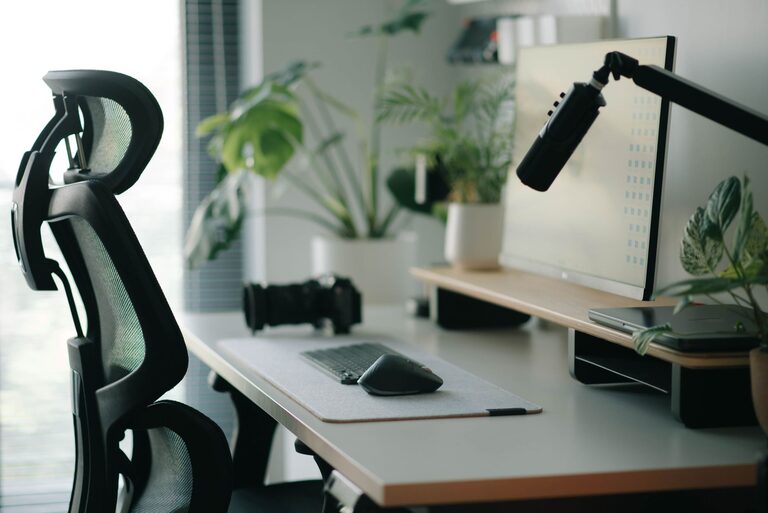
Your monitor should be easy to view without requiring you to lean forward or constantly turn your head. Place it directly in front of you if you use one screen regularly. If you use two screens, position the primary screen in the center and place the second one beside it.
A few simple guidelines can help:
- Keep the top of the screen near eye level or slightly below it.
- Place the monitor about an arm’s length away, adjusting for text size and personal comfort.
- Angle the screen to reduce reflections from windows and overhead lights.
- Increase text size instead of leaning closer when content is difficult to read.
A monitor stand, sturdy riser, or stack of stable books can help you reach a more comfortable height. Make sure the support is secure and does not block ventilation or create an unstable setup.
Choose a Comfortable Keyboard and Mouse Position
Your keyboard and mouse should be close enough that you do not need to reach forward. Keep your elbows near your sides and let your shoulders rest naturally. The keyboard should sit at a height that allows your hands to stay relaxed while typing.
Avoid placing the keyboard at the far edge of the desk if it forces your wrists to rest on a sharp surface. You may prefer a soft desk mat or a keyboard with a comfortable shape. However, the best option depends on your habits and preferences.
Place the mouse beside the keyboard rather than at a wide angle. If you use a separate number pad often, consider whether it makes the keyboard too wide for your preferred mouse position. A compact keyboard or separate number pad may give you more flexibility.
Make Your Chair Part of the Setup
A desk cannot feel comfortable if your chair does not support your normal working position. Adjust the chair so your feet can rest flat on the floor or on a stable footrest. Your knees should have room to move, and the chair should allow you to sit without leaning sharply to one side.
Try these adjustments:
- Set the seat height so your desk feels easy to use without raised shoulders.
- Keep your back supported in a relaxed, natural position.
- Leave enough space between the back of your knees and the front edge of the seat.
- Use a footrest if your feet do not reach the floor comfortably.
You do not need an expensive chair to create a better setup. A stable chair with sensible adjustments can work well when the desk, monitor, and keyboard are positioned properly.
Improve Lighting and Reduce Glare
Good lighting helps you see your work clearly and may make the space feel more inviting. Combine natural light with a desk lamp or room lighting so your screen is not the only bright source in the room.
Place a desk lamp to the side of your monitor rather than directly behind it or in your line of sight. A lamp with adjustable brightness can be useful as daylight changes. Choose a shade or diffuser that spreads light evenly instead of creating a harsh bright spot.
If glare appears on your screen, try changing the monitor angle, moving the lamp, or adjusting the desk position. Cleaning the screen regularly can also improve visibility.
Reduce Clutter With Simple Zones
A crowded desk can make it harder to find what you need and easier to lose focus. You do not have to remove everything. Instead, divide the desk into simple zones:
Daily-use zone
Keep your keyboard, mouse, notebook, and water bottle within easy reach. These are the items you use most often.
Reference zone
Place documents, books, or a tablet to one side of the desk. A document holder can keep reading material upright and reduce the need to look down repeatedly.
Storage zone
Move spare cables, stationery, and rarely used equipment into a drawer, box, or shelf. Labeling small containers can make it easier to put items away.
Personal zone
Leave room for one or two items that make the space enjoyable, such as a small plant, photo, or decorative object. A personal touch can make your workspace feel comfortable without adding visual clutter.
Manage Cables and Technology
Loose cables can make a desk look untidy and may get in the way of your feet or chair. Group cables by device and use simple clips, ties, or sleeves to keep them together. Labeling both ends of a cable can save time when you need to disconnect or replace equipment.
Keep chargers and adapters where you can reach them without pulling cables across the desk. If you use a power strip, place it in a safe, accessible location rather than hiding it under a pile of items.
Review your devices regularly. Removing unused accessories and old cables can free up space and simplify your daily routine.
Create a Focus-Friendly Environment
Comfort is only one part of a productive workspace. Consider the distractions around your desk and choose practical ways to limit them.
Use headphones, soft background sound, or a quiet room if that helps you concentrate. Keep your phone out of reach during tasks that require deep attention, or turn off notifications that are not important. A simple “focus” sign or status message can also help others know when you prefer not to be interrupted.
Keep a short list of your current priorities visible. Too many notes and reminders can create more noise, so display only the information you need for the day.
Build Movement Into Your Routine
Even a carefully arranged desk should not encourage you to stay in one position for too long. Change positions when possible, stand during phone calls, or take brief movement breaks between tasks. Use natural stopping points, such as the end of a meeting or completed section of work, as reminders to step away.
A short break can also be a chance to refill your water, adjust the room, or clear unnecessary items from the desk. These small habits help keep the setup comfortable and ready for the next task.
Use a Quick Weekly Reset
Set aside a few minutes each week to reset your workspace. Return items to their storage zones, clear old papers, wipe the desk, and check whether your equipment is still positioned comfortably.
Ask yourself:
- Can I reach the items I use every day?
- Is the screen easy to view without glare?
- Are the keyboard and mouse close enough?
- Is the lighting comfortable at different times of day?
- What is one distraction I can remove?
Your ideal desk setup may change as your work, room, or equipment changes. Treat it as an ongoing adjustment rather than a one-time project. With a clear layout, comfortable positioning, and a few simple routines, your desk can better support focused and enjoyable work.
About the Author